September 11, 2013

freedom boards (K20, KL46) arrived !

I have received 2 new freedom boards (K20 and KL46, they have been on the market, but I have not had them yet).. I am fully equipped here (all hardware almost ready, only to solder sockets).

First to come it's still KL02, it has been on hold since July. Sorry guys.


September 10, 2013

mbed - Add library, program and create new cookbook (tip & tricks)

I have added new libraries to mbed. That was quite intuitive. I faced one problem, if you upload your own files, there are only two options - add program or library. Firstly, I added files as library, create a folder and moved all files there. I also added files as program and then moved them. What I consider as missing part there, add Folder to a project with desired name.
Adding files has its limits (I was able to import only 20 files, more were ignored).

I realized that I was adding libraries (different symbol than normal folder) at the moment when I was about to commit new library ( it asked to commit all libraries which are part of the library).
 
There is folder (folder icon) and mbed-rtos which is the library icon.

Another one, how to add new page to the cookbook. Here's an explanation, google was not my friend in the beginning:

mbed cookbook [http://mbed.org/cookbook]

Create new link (an example http://mbed.org/cookbook/my_new_link), start editing.


September 5, 2013

Wi-Go & mbed application board (update)

Just a tiny update, I received two new boards in the last 3 weeks. That's why I haven't got time to write more tutorials, neither to port some freedom boards. More you want to achieve, less time you have left :)

The first board was the application mbed board, very first NXP chip on my desk. I tested mqtt which did not work due to server problems, some ethernet applications. I'll get closer look at mqtt in the upcoming weeks.


The second board was the Wi-Go board (cc3000). It is already supported in mbed although cc3000 is not complete yet.
I am currently rewriting cc3000 driver and will be available on mbed soon. I'll share more with you later.

September 2, 2013

Hard fault - ARM cortex - get PC without any code


I would like to emphasize this small "trick" which is from the book The definitive guide to the ARM Cortex-M0.
There are many articles explaining how to write a routine to retrieve a stack frame from a hard fault. I just want to share what I use regularly. It omits details which are crucial to find out why it has crashed. However, when I get to the problematic instruction, I realize what has gone wrong and correct that error.

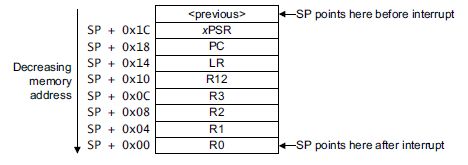
From this picture (reuse from sticky bits blog), you see that PC is stacked at Stack pointer value + 0x18. Thus what we need to to, get an SP pointer value (MSP register value usually). Add 0x18 to its value and we should see the address where hard fault was invoked. Isn't it easy?


Thanks Joseph Yui for particularly definite guide books for ARM !