Showing posts with label mbed. Show all posts

April 8, 2014

New FRDM board on mbed with ethernet (news)

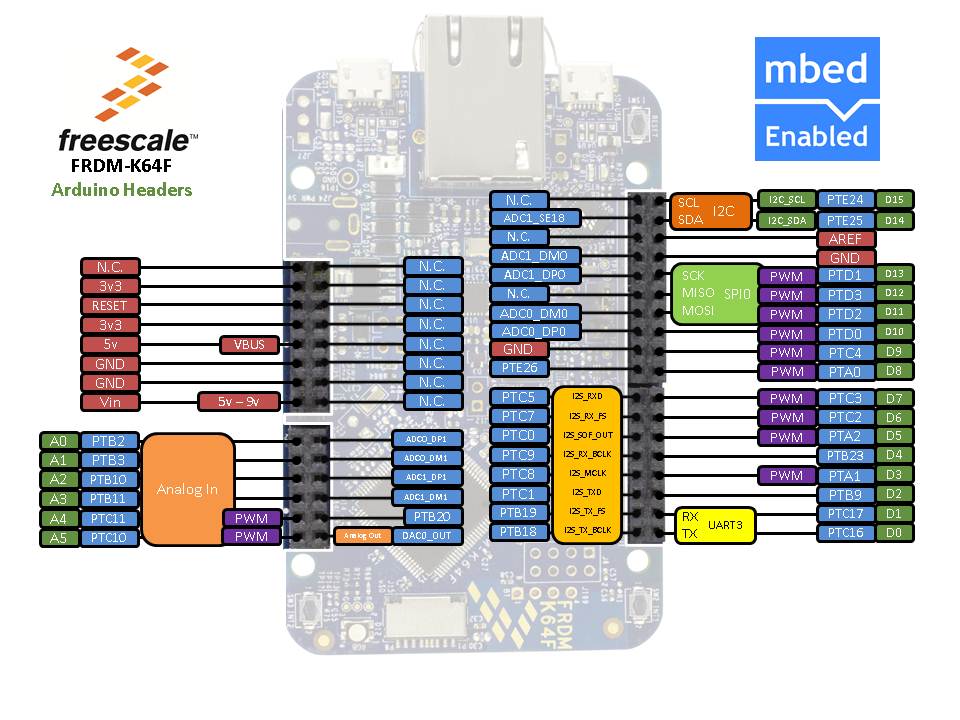
I haven't written any blog lately. The reason (for some it can be an excuse) is that I have been porting the new target to the mbed. It's FRDM-K64F which has been announced during FTF 2014.


The link to the platform page to get more information  : FRDM-K64F
The mbed ethernet support is not yet ready, will be available soon.

EnjoY!

February 22, 2014

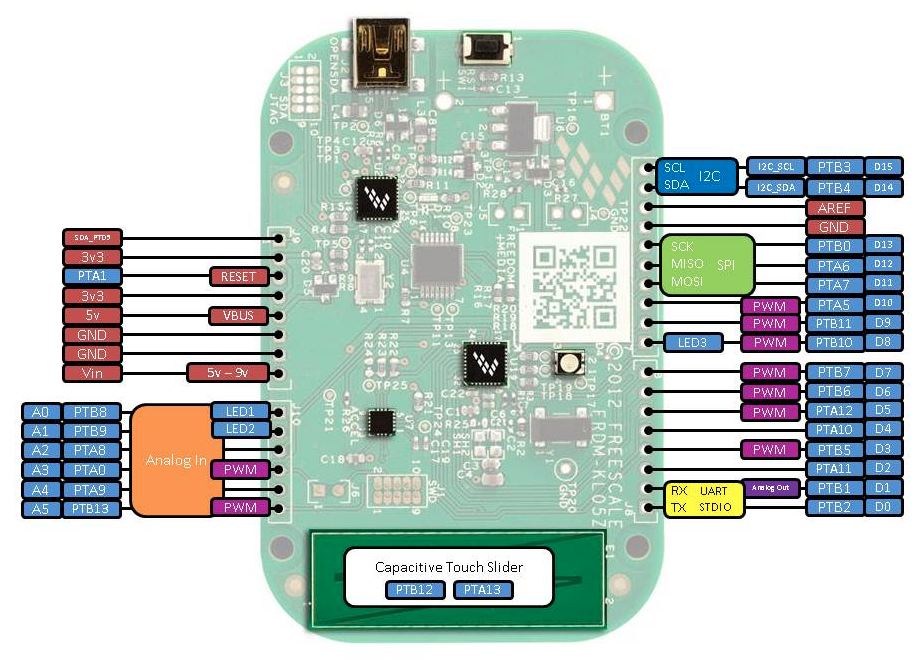
FRDM KL05Z is mbed enabled (news)

The FRDM-KL05Z board was my first target added to mbed. I would even say that was my initial experience with mbed sources. That was back in June 2013. It was added to mbed.org yesterday. This became 3rd Freescale board available on mbed.


FRDM-KL05Z [mbed.org/platforms]

It supports export to ARM GCC, uVision and CoIDE.

Paul Staron shared an info about low power modes and his power measurements. Not possible to carry out on FRDM board though. Here's a link for more information FRDM-KL05Z sleep modes and RTC [mbed.org/forum]

February 17, 2014

CoIDE export is available for KL25Z on mbed (news)

My latest article was how to use CoIDE with C++. I added exporters for CoIDE to mbed. I was able to make it work for KL25Z, KL05Z (not yet online on mbed.org site, will be soon). LCP1768 is functional but not through CMSIS-DAP, due to a problem which was reported to CoIDE team a while ago.

The exporter is online in the mbed compiler, see picture below.


Enjoy using CooCox CoIDE with KL25Z and mbed! If there are any problems, please report them on the mbed site, or just here in comments.

January 27, 2014

CoIDE fix for using C++

Frank V. reported an issue with linking C++ libraries which I confirmed. I just issued a new pull request for mbed exporters with the fix. In case you followed my last tutorial for CoIDE & mbed, this might be helpful.

The problem was that CoIDE completely ignored c++ libraries in the Misc controls for LINK. To surpass this issue, you have to add libraries to the Linked Libraries. Add there the libraries (type there names):
mbed
stdc++
supc++
m
gcc
c
nosys

If you prefer to change it directly in the xml (coproj file), add this to already created project:
        <LinkedLibraries>
          <Libset dir="" libs="mbed"/>
          <Libset dir="" libs="stdc++"/>
          <Libset dir="" libs="supc++"/>
          <Libset dir="" libs="m"/>
          <Libset dir="" libs="gcc"/>
          <Libset dir="" libs="c"/>
          <Libset dir="" libs="nosys"/>
        </LinkedLibraries>


And of course, remove 
-lmbed; -lstdc++; -lsupc++; -lm; -lc; -lgcc; -lnosys; -lmbed; -lstdc++; -lsupc++; -lm; -lc; -lgcc; -lnosys;

from UserEditLinker in the xml file or just from Misc control in the IDE. The path to look for mbed library is already there thanks to using ld file which adds it to the linker searching path.

I tested this setup with cc3000 udp server demo. 

I added KL05Z exporter for CoIDE, can test it using project.py. There is also LPC1768 present, but currently has problems in CoIDE with CMSIS-DAP (due to the bootloader), so it's not enabled yet. 

January 11, 2014

CoIDE with KL25Z and mbed (C++) (tutorial)

I decided to start contributed to open source one year ago, as my start project I selected CoX library. I was pleased with CooCox CoIDE back in those days, it's light, easy to set-up, fast and was reliable. However, I abandoned CoX library since than as well as their IDE named CoIDE. This tutorial brings back CoIDE to my life as GCC is supported to all available Freescale targets.

I am running this tutorial on KL25Z, but as I checked, also NXP chips are supported there so this should be applied to more mbed targets than just KL25Z.

I ported CMSIS-DAP to many new freescale chips, now also bootloader is available. I was looking for open source IDE with working debugger. Finally, found something which is fast, reliable, and works with just few steps.

The very first thing is to install CoIDE.  Visit link CooCox IDE [www.coocox.org] . The installation is straightforward. Once installed, open your CoIDE and select toolchain path


I added there the following path :
C:\Program Files\GNU Tools ARM Embedded\4.7 2013q3\bin

If you want to test mbed with KL25Z in CoIDE, download the project here Hello world project KL25Z CoIDE [mbed.org/media/uploads/Kojto]. I'll explain below how to create your own project, so you can change anything you like like adding your own sources, libraries.

In the same tab as Select Toolchain Path, there's New Project (the top selection). Create a new project, select a name and click next. I use KL25Z_mbed as name of the project (which will be used in some steps, so might follow the same).
The next step is to select a chip or a board, just use Chip
The chip which is assembled on the freedom KL25Z board, is MKL25Z128VLK4. Then click Finish. The project is created and should be visible in the right bottom corner.

This creates an empty project with one code file (main.c). Please remove that file. Export a basic hello world example from the mbed site (GCC export option), as reference this one Hello world example [mbed.org/users/simon/code]. Add it to your online compiler and export it to GCC.

Unzip the exported Hello world anywhere. The example has only main.cpp file and the mbed folder which contains mbed library with header files + some object files. We need to copy those files to our new created project's folder. There is already .coproj file which gets created later, so don't get surprised by the below picture.

 After copying them, we go back to CoIDE where we need to set-up our new project. Click on the project with the right-button on your mouse, and select Configuration.
This is the crucial step, to set up correctly gcc project. There are few tabs : Device, Compile, Link and more.

We can skip device, as we already set device (chip). Go to the Compile tab:

Add include paths (mbed folder, target_kl25z folder inside and the toolchain_gcc_arm which is inside target_kl25z folder). Add to Misc. Controls:

-fno-common; -fmessage-length=0; -Wall; -fno-exceptions; -ffunction-sections; -fdata-sections; -DTARGET_KL25Z; -DTARGET_M0P; -DTARGET_Freescale; -DTOOLCHAIN_GCC_ARM; -DTOOLCHAIN_GCC; -D__CORTEX_M0PLUS; -DARM_MATH_CM0PLUS;  -std=gnu++98

We could add those defines up there to Defined Symbols, does not matter though. This should be for compile tab, move to the Link tab.


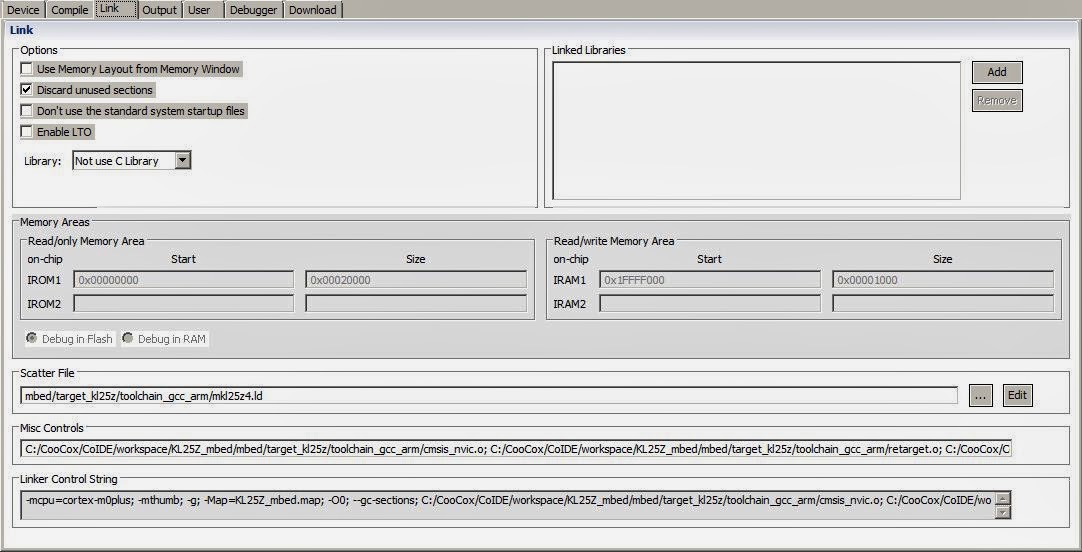
The important detail here is to uncheck Use Memory Layout from Memory Window and add linker script path (scatter file).

Add this to Misc. Controls:
--specs=nano.specs; ${project.path}/mbed/target_kl25z/toolchain_gcc_arm/cmsis_nvic.o; ${project.path}/mbed/target_kl25z/toolchain_gcc_arm/retarget.o; ${project.path}/mbed/target_kl25z/toolchain_gcc_arm/startup_MKL25Z4.o; ${project.path}/mbed/target_kl25z/toolchain_gcc_arm/system_MKL25Z4.o;

Add to Linked Libraries (just type the names there):
mbed, stdc++ , supc++ , m , gcc , c , nosys

The last thing to check is Debug tab, where select CMSIS-DAP, SWD and 1MHZ (this should be set as default for that chip).

Now press F7 (BUILD) which builds the project. It should display BUILD SUCCESSFUL if everything is correct along with size of the each areas and the command invoked.

Connect your board which mbed interface (CMSIS-DAP) and click on Debug icon (or press CTRL+F5). Debugging starts, it puts the breakpoint inside the main function, as it's shown in the picture below.


Happy debugging ! I am surprised with a speed, compared to pyOCD I tried with eclipse, this is really quick.

I will find out when other mbed chips are going to be supported.

Update1: I am currently working on an exporter to CoIDE for KL25Z, and probably later also other targets will follow.
December 29, 2013

How to build mbed src and Hello world (AMRCC, ARM GCC) (tutorial)

This tutorial is dedicated to building mbed sources and exporting hello world. K20D5M is going to be used as an example, because it is still not available in the mbed online compiler. Thus this give us to compile any application based on mbed libraries. My machine is running Windows so paths presented in the 2nd step are for windows.

1. Download the mbed github repository

If you are familiar with git, just clone repository using git clone command. For those who don't use git, download the repository as archive (zip).
Link mbed src ZIP archive (~5MB) [github.com/mbedmicro/mbed]

After downloading is completed, unzip the archive.

2. Set your toolchain paths

There few toolchains which can be used, I'll present ARM GCC and ARMCC (uVision). Create a new file named private_settings.py in the workspace_tools directory. This private settings file defines settings which overrides default settings.

from os.path import join
#KEIL
ARM_PATH = "C:/Keil/ARM"
ARM_BIN = join(ARM_PATH,"ARMCC","bin")
ARM_INC = join(ARM_PATH,"RV31","INC")
ARM_LIB    = join(ARM_PATH,"ARMCC","lib")
ARM_CPPLIB = join(ARM_PATH, "ARMCC","lib","cpplib")

#GCC ARM
GCC_ARM_PATH = "C:/Program Files/GNU Tools ARM Embedded/4.7 2013q3/bin"

BUILD_OPTIONS = ["debug-info"]

ARM_ paths are used for ARMCC (uVision IDE, paths for each folders might vary, as I had problems with previous versions, because they changed the folder structure), GCC_ARM_ path for ARM GCC toolchain path. Set those according your installation folder.
I use debug-info build-option, to include debug symbols.

3. Build sources for your target

To build mbed sources for TARGET and TOOLCHAIN, use command:
python build.py -m TARGET -t TOOLCHAIN

The list of supported targets is quite long, to check if your TARGET is supported TARGETS array [github.com/mbedmicro/mbed].
Each TARGET defines supported TOOLCHAIN. For example, K20D5M has ARM and GCC_ARM.

To build for ARM (that's ARMCC used in uVision for example)
python build.py -m K20D5M -t ARM

To build for GCC ARM
python build.py -m K20D5M -t GCC_ARM

If you just invoke command without -t, the target will be built for all supported toolchains.

4. Using exporters

As soon as you have built mbed sources for your target, go to my previous tutorial about using exporters. There is just shown to export Hello world example.

How to use mbed exporters

5. Build an application

Using ARM GCC, use makefile to build an application. If uVision is used, build the application in the uVision IDE. No matter what toolchain you use, they should generate a binary file, which can be copied to mbed msd drive. Same procedure as it's used by the mbed online compiler.

December 28, 2013

FRDM KL05, FRDM K20D50M testing for mbed enablement

Is anybody out there who wants to participate in enabling those 2 platforms? I posted instructions how to debug KL05Z target offline with mbed sources few weeks ago. However, I did not receive any feedback if that is working for you or any problems with its implementation.

The fresh new target K20D50M is still not complete, thus needed some more tweaks to complete its implementation.

Here's a post from mbed, good place to start:  Let's enable KL05Z and K20D5M targets online on mbed [mbed.org/forum/mbed]
Leave a comment, preferably there on mbed community.

December 26, 2013

How to use mbed exporters (tutorial)

I always created my own projects while I was developing offline with mbed. Fortunately, there are exporters which I assume are used in the online compiler. They are available in the mbed sources, in the folder /workspace_tools/export, Github mbed - export folder [github.com/mbedmicro/mbed]

These exporters support more platforms than online compiler, thus if you see a platform in the mbed sources but is not yet available online, this is your chance to start using your target. It requires IDE or at least a toolchain to compile it.

What targets are currently supported by exporters?
  • NUCLEO_F103RB
  • KL25Z,
  • LPC1347
  • LPC11U24_301
  • LPC4330_M4
  • nRF51822,
  • LPC11U35_401
  • LPC810
  • KL46Z
  • LPC812
  • KL05Z
  • LPC1768
  • K20D5M
  • LPC4088
  • LPC11C24
  • MBED_MCU
  • LPC1114
  • LPC11U24,
  • STM32F407
  • LPC2368

To see what options are available, invoke project.py, an output:

d:\Code\git_repo\github\mbed\workspace_tools>python project.py


[ERROR] You have to specify one of the following tests:
[ 0] MBED_A1: Basic
[ 1] MBED_A2: semihost file system
[ 2] MBED_A3: C++ STL
[ 3] MBED_A4: I2C TMP102
[ 4] MBED_A5: DigitalIn DigitalOut
[ 5] MBED_A6: DigitalInOut
[ 6] MBED_A7: InterruptIn
[ 7] MBED_A8: Analog
[ 8] MBED_A9: Serial Echo at 115200
[ 9] MBED_A10: PortOut PortIn
[ 10] MBED_A11: PortInOut
[ 11] MBED_A12: SD File System
[ 12] MBED_A13: I2C MMA7660
[ 13] MBED_A14: I2C Master
[ 14] MBED_A15: I2C Slave
[ 15] MBED_A16: SPI Master
[ 16] MBED_A17: SPI Slave
[ 17] MBED_A18: Interrupt vector relocation
[ 18] MBED_A19: I2C EEPROM read/write test
[ 19] MBED_A20: I2C master/slave test
[ 20] MBED_A21: Call function before main (mbed_main)
[ 21] MBED_A22: SPIFI for LPC4088 (test 1)
[ 22] MBED_A23: SPIFI for LPC4088 (test 2)
[ 23] MBED_A24: Serial echo with RTS/CTS flow control
[ 24] BENCHMARK_1: Size (c environment)
[ 25] BENCHMARK_2: Size (float math)
[ 26] BENCHMARK_3: Size (printf)
[ 27] BENCHMARK_4: Size (mbed libs)
[ 28] BENCHMARK_5: Size (all)
[ 29] MBED_1: I2C SRF08
[ 30] MBED_2: stdio
[ 31] MBED_3: PortOut
[ 32] MBED_4: Sleep
[ 33] MBED_5: PWM
[ 34] MBED_6: SW Reset
[ 35] MBED_7: stdio benchmark
[ 36] MBED_8: SPI
[ 37] MBED_9: Sleep Timeout
[ 38] MBED_10: Hello World
[ 39] MBED_11: Ticker
[ 40] MBED_12: C++
[ 41] MBED_13: Heap & Stack
[ 42] MBED_14: Serial Interrupt
[ 43] MBED_15: RPC
[ 44] MBED_16: RTC
[ 45] MBED_17: Serial Interrupt 2
[ 46] MBED_18: Local FS Directory
[ 47] MBED_19: SD FS Directory
[ 48] MBED_20: InterruptIn 2
[ 49] MBED_21: freopen Stream
[ 50] MBED_22: Semihost
[ 51] MBED_23: Ticker 2
[ 52] MBED_24: Timeout
[ 53] MBED_25: Time us
[ 54] MBED_26: Integer constant division
[ 55] MBED_27: SPI ADXL345
[ 56] MBED_28: Interrupt chaining (InterruptManager)
[ 57] MBED_29: CAN network test
[ 58] MBED_30: CAN network test using interrupts
[ 59] MBED_31: PWM LED test
[ 60] CMSIS_RTOS_1: Basic
[ 61] CMSIS_RTOS_2: Mutex
[ 62] CMSIS_RTOS_3: Semaphore
[ 63] CMSIS_RTOS_4: Signals
[ 64] CMSIS_RTOS_5: Queue
[ 65] CMSIS_RTOS_6: Mail
[ 66] CMSIS_RTOS_7: Timer
[ 67] CMSIS_RTOS_8: ISR
[ 68] RTOS_1: Basic
[ 69] RTOS_2: Mutex
[ 70] RTOS_3: Semaphore
[ 71] RTOS_4: Signals
[ 72] RTOS_5: Queue
[ 73] RTOS_6: Mail
[ 74] RTOS_7: Timer
[ 75] RTOS_8: ISR
[ 76] RTOS_9: File
[ 77] NET_1: TCP client hello world
[ 78] NET_2: UDP client hello world
[ 79] NET_3: TCP echo server
[ 80] NET_4: TCP echo client
[ 81] NET_5: UDP echo server
[ 82] NET_6: UDP echo client
[ 83] NET_7: HTTP client
[ 84] NET_8: NTP client
[ 85] NET_9: Multicast Send
[ 86] NET_10: Multicast Receive
[ 87] NET_11: Broadcast Send
[ 88] NET_12: Broadcast Receive
[ 89] NET_13: TCP client echo loop
[ 90] UB_1: u-blox USB modem: HTTP client
[ 91] UB_2: u-blox USB modem: SMS test
[ 92] USB_1: Mouse
[ 93] USB_2: Keyboard
[ 94] USB_3: Mouse_Keyboard
[ 95] USB_4: Serial Port
[ 96] USB_5: Generic HID
[ 97] USB_6: MIDI
[ 98] USB_7: AUDIO
[ 99] CMSIS_DSP_1: FIR
[100] DSP_1: FIR
[101] KL25Z_1: LPTMR
[102] KL25Z_2: PIT
[103] KL25Z_3: TSI Touch Sensor
[104] KL25Z_4: RTC
[105] KL25Z_5: MMA8451Q accelerometer
[106] EXAMPLE_1: /dev/null
[107] EXAMPLE_2: FS + RTOS


Usage: project.py [options]

Options:
-h, --help show this help message and exit
-m MCU, --mcu=MCU generate project for the given MCU (NUCLEO_F103RB, KL25Z,
LPC1347, LPC11U24_301, LPC4330_M4, nRF51822,
LPC11U35_401, LPC810, KL46Z, LPC812, KL05Z, LPC1768,
K20D5M, LPC4088, LPC11C24, MBED_MCU, LPC1114, LPC11U24,
STM32F407, LPC2368)
-p PROGRAM The index of the desired test program: [0-107]
-i IDE The target IDE: ['ds5_5', 'gcc_arm', 'codered',
'codesourcery', 'uvision', 'iar']
-b Use the mbed library build, instead of the sources

The output provides all information which we need to build a project. As I pushed today K20D5M target to mbed repository, I'll take that as an example how to start with mbed target which is not yet supported in the mbed compiler.
If you don't have prebuilt mbed sources for your target, don't use -b option (you can use it if you have built your target previously, then it creates the mbed library, same output as from the online compiler exporter). If you have not built target sources, use -b option, error is shown.

The very first application we can build is Hello world ([ 38] MBED_10: Hello World) To build it for GCC ARM, invoke:

python project.py -m K20D5M -p 38 -i gcc_arm

If you receive an error which contains jinja2, that means the projects generators require jinja2 package, please add it to your python installation. Easy install can help you, for more help, a procedure Jinja2 windows - how to install [forums.udacity.com/questions]

The output should be many compiled files, at the end [OK]. In the mbed root directory, there's should be a new folder build. Inside in the path build/export/workspace are sources which were copied there by an exporter. In the build/export folder, should be located an archive MBED_10_GCC_ARM_K20D5M.zip
This archive contains the exported application, unzip it , invoke make command to build Hello world application.

Freescale K20D50M (Target K20D5M) was added to mbed sources (news)

I have added another Freescale target to mbed github repository, this time it's the first Freescale Cortex M4 target.


I had pushed a branch which contains K20D5M target files, it was merged a minute ago to mbed master. It contains exporters for GCC ARM and uVision (ARMCC). I will add a new blog post how to use those exporters, it completely facilitates testing.

The K20D5M is supported, not fully functional. Demo like Hello world works, but for example I2C is not yet complete, neither PWM. Any help with this target is welcomed !

Update your K20D50M to CMSIS-DAP interface, which I shared on my mbed notepad, currently in beta version, link CMSIS-DAP K20D50M [mbed.org/users/Kojto/notebook]

If any questions, leave a comment or contact me on mbed. I will be working on this to complete entire HAL for K20D5M target.

December 11, 2013

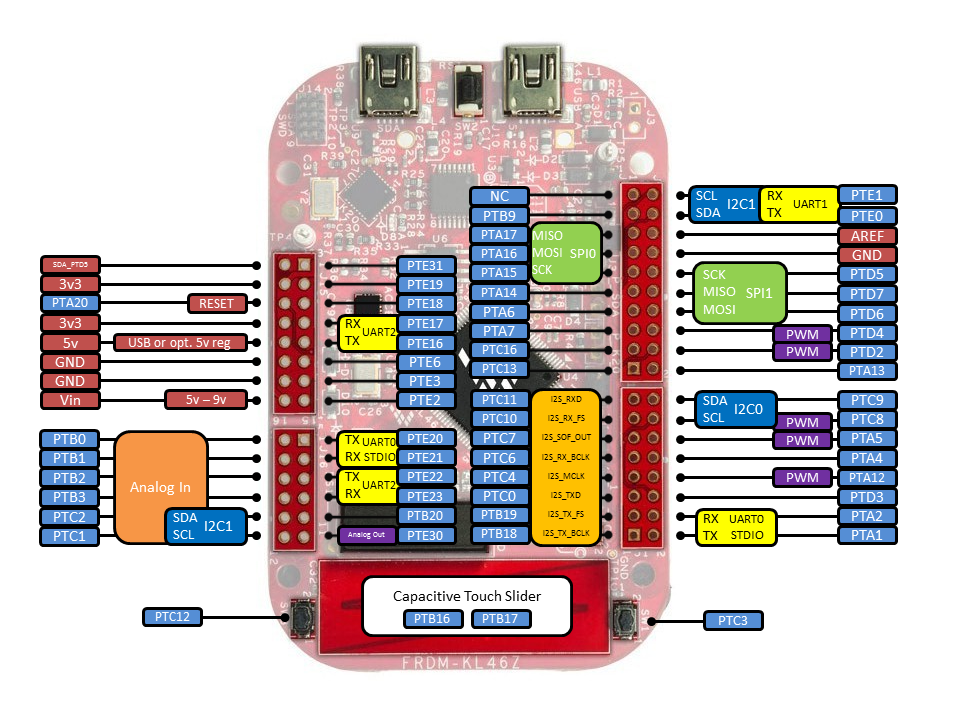
The freedom KL46Z online on mbed (news)

Today is a day full of updates since the morning. Another great news for us, mbed geeks. The freedom board KL46Z is among enabled mbed platforms, the second freedom platform.

Link: FRDM-KL46Z [http://mbed.org/handbook]


Here's a picture, directly from mbed handbook for KL46Z, with all needed pins description.

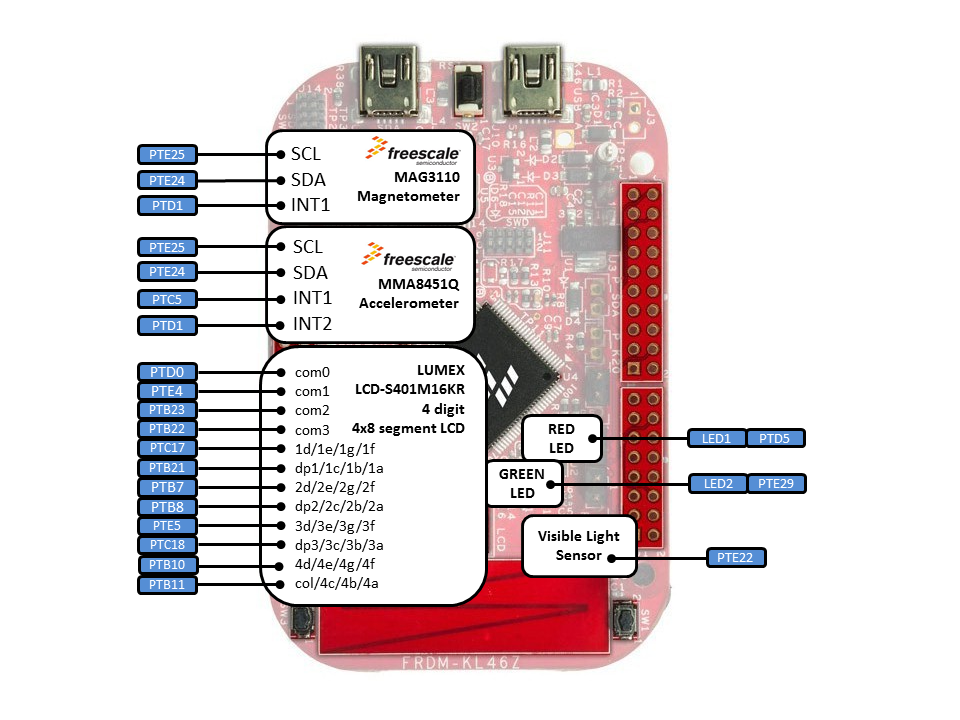
The second picture shows how are sensors connected,
Looks as good, doesn't it? Thanks to mbed for this descriptive pictures!

I have added exporters for uVision and GCC yesterday, got merged today to master.

Thanks to Michael Conners, who created the initial version of HAL for KL46Z. His pull request started my contribution to KL46Z HAL.

mbed KL25Z export to ARM GCC (news)

The export for target KL25Z to GCC ARM is available !!


Please share !

December 4, 2013

CMSIS-DAP for the freedom platform (news)

As many of you know, I recently added new freedom platforms to CMSIS-DAP, with help from the mbed team and also bigarmer2013.

I built today the CMSIS-DAP for the following boards:
  • KL05Z
  • KL25Z
  • KL46Z
  • K20D50M
You can download them here CMSIS-DAP for the freedom platform [mbed.org/users/Kojto/notebook]

Be aware, they are for testing purposes at the moment

If you have any problems, report them on mbed site, preferably in the notebook comments. EnjoY!

November 28, 2013

pyOCD with KL25Z (introduction)

This is an introduction to pyOCD, my very first steps getting familiar with pyOCD. Two mbed users reported locking of their KL25Z chips with pyOCD. I hope we find out why!

The pyOCD used to be part of mbed github repository, but not anymore. It was separated, can be found here pyOCD repo [github.com/mbedmicro/pyOCD]. It has awesome readme file there, which serves as documentation.

the official mbed page for pyOCD Debuging from GDB using pyOCD [mbed.org/blog].

I started with pywinusb (using windows on my laptop), installed via easy_install.


The second step was to build pyOCD, run from the pyOCD root directory python setup.py install.


Connect KL25Z to your PC, be certain it has mbed interface! Time to start gdb session, either gdb from toolchain or from pyOCD. I chose to run gdb_test.py which is in pyOCD/test folder.


KL25Z detected, presume to flashing part. To be save, I opened basic_test.py located in test directory and commented out line 156 flash.flashBinary(binary_file). This prevents from flashing (locking alert which I explain later).


Everything went ok according to the console, flashing was skipped though. Now return the line 156 to test flashing part. Have ready compiled GCC program (I use bin file from the example I created for mbed GCC KL25Z demo).

If you run it without arguments, the default path is /binaries/l1_target.bin, the name of bin file for KL25Z is l1_kl25z.bin . Flashing was successful but program was not running correctly and chip got to secured state. I restarted gdb test script, received an error. I opened uVision, it displays a warning that chip is locked, but not permanently, fortunately! I have to get my prototype board, to continue with testing.

I'll share more once I explore what's going on and why chip got locked once.

Update 1st of December:
I have been debugging it for a while, I added some extra code which completely messed connection to the chip, gdb returned error. Once I found out what I did wrong, everything seems to be functional.
Even flashing different binaries does not lock chip, still using pyOCD scripts, not directly its gdb implementation.


November 21, 2013

KL46Z and KL05Z boards have CMSIS-DAP interface (update)


I have spent my last evenings with CMSIS-DAP, mostly with the interface layer. There has been some motion in CMSIS-DAP recently. The master branch already contains these 2 interfaces.

After porting mbed SDK to those 2 freedom boards, this was on my todo list as a final step. They should be tested, both SDK and also CMSIS-DAP, then enabled on mbed. Can't wait to see these 2 boards online.

I can come back to the freedom board K20D50M and its mbed SDK implementation. Also what I would like to do, start with pyOCD.

November 13, 2013

CMSIS-DAP interface and porting the new boards (news)

The CMSIS-DAP interface was published by mbed team 2 weeks ago. Here's the link
CMSIS DAP [github.com/mbedmicro]

The handbook for mbed firmware can be found at cmsis-dap-interface-firmware [mbed.org/handbook] . It explains the file structure plus some basics, not detailed implementation though, which is actually crucial. I really appreciate what mbed does and the way they do! To open and share with us this interface, takes a lot of effort.

I decided this week, to get familiar with it, attempt to add HAL for the other freedom platforms which are already supported on mbed github (KL05Z, KL46Z). This is the last step (testing will be carried out anyway) to enable them online. They need the mbed interface!

KL05Z is the first one I started. However, the code is commented, but not everything is clear, I have to do lot of guessing.. Thus KL05Z flashing by bin is not working yet, it returns SWD error which I located where it fails, have to examine why it fails and do some corrections.

If I succeed, I can share the testing version of that interface.

One side note: ARM GCC export for KL25Z will be available online soon! Can't share more at the moment, but I will !

November 6, 2013

cc3000 mbed - EthernetInterface (update)

Quick update, what's going to come to the host driver for cc3000 on mbed. We have been fixing few issues in the driver and implemented the new API (just an extension of the current one) which is easier to use. And mostly users with mbed will be familiar with it, because lot of net drivers are using the same API.

I pushed all these changes today, slowly updating all examples, you can currently check this change in the hello world demo, ntp client demo. There's some clean-up to do as well. The constructor for cc3000 was changed. That was the only change which broke the previous code in all demos, sorry.

I will post some updates about the mbed, I have added few more things there for the freedom platform. Also I attended the mbed connect meeting in San Jose. More to come!

October 20, 2013

mbed GCC makefile v2.0 (update)

I updated my makefile for mbed. What does it bring new?

Not only defined for KL25Z as it was by default. I added a Platforms file where are all platforms I found supported in the mbed sources. All you need to do, choose your board.

Supported platforms:
  • KL05Z
  • KL25Z
  • KL46Z
  • LPC1768
  • LPC11U24
  • LPC11U24_301
  • LPC1347
  • LPC1114
  • LPC11C24
  • LPC11U35_401
  • STM32F407 
Link: mbed ARM GCC Makefile [github.com/0xc0170]

October 9, 2013

cc3000 driver on mbed (news)

As I wrote previously, we have been working on cc3000 driver which was released yesterday on mbed. It was about the time, I started to port C code to C++ back in August. I did not anticipate the chip is so complex.

Here's link to the cookbook cc3000 cookbook [http://mbed.org/cookbook]

I also published 11 examples ready to be used for any mbed platform available on mbed (2 boards have predefined init function, the others need to be added based on user's configuration). Mbed Socket interface is part of cc3000 driver which enables to use many ethernet libraries. To mention some HTTPclient, Twitter, Websockets.

I had so much fun with it, the most excited I was when tweet from my Wi-Go was published. Not to mention that this driver was also mentioned on adafruit blog : cc3000 for mbed [http://www.adafruit.com/blog/]
I hope that driver will help many people with IoT & mbed !

Does anybody need any tutorials about cc3000? How smartconfig works (and picture step-by-step guide for the Simple socket demo) ?
Or what about any missing demo for cc3000? Leave a comment.

October 5, 2013

mbed makefile for the freedom platform (update)

Those who use my makefile for freedom boards on mbed (KL25Z at the moment), please update if you want to have more flash available for your application.

Current makefile version is 1.2. 
Link: KL25Z makefile [https://github.com/0xc0170]

It was set previously that floating printf/scanf were included. I decided to comment that linker option out. The text size of mbed hello world which I used in the tutorials, went down from 26kB to 2.7kB.

For other freedom boards, you can use this makefile. I have been using it for KL46 (only to rename KL25Z to KL46Z), run without any problems.

I will add support of GCC for KL05Z soon.

September 29, 2013

mbed freedom KL46Z (update - testing phase)

I created a branch from mbed master, which contains KL46Z GCC ARM support.
KL46Z is similar to KL25Z. Be aware of their differences. KL46Z is bigger brother of KL25Z, it has on top of KL25Z features - I2S and LCD module. The memory footprint is also bigger (256mb flash, 32kb ram).

I officially started testing today, I made GCC running with my makefile few days ago. This time I took a look at MUX options in HAL layer and interrupts. Of course, there were problems I had to face.

I added KEIL (in mbed is named ARM). I met again with BKTP instruction in KEIL (heap was set to 0, as the last time), clock configuration was set to a wrong value. Consequently, timer's clock were not activated - no Ticker interrupt.

All this updates are currently on my branch, will be available soon.