I am currently writing wiki pages for the project generator. If you are interested in the project, read it and provide feedback.
The link Project generator - Wiki pages [github.com/0xc0170/project_generator/wiki]
I am going to merge IAR options once I finish and test them, currently implementation on the branch. It takes longer time than uVision, as IAR has many separate options.
I finished the release of v0.1 this week, created a new tasks for v0.2.
My focus in the v0.2 will be on documentation, stabilize uVision, IAR and creating one generic Makefile for GCC toolchains.
Showing posts with label ARM GCC. Show all posts
Showing posts with label ARM GCC. Show all posts
August 29, 2014
December 11, 2013
mbed KL25Z export to ARM GCC (news)
The export for target KL25Z to GCC ARM is available !!

Please share !

Please share !
December 10, 2013
kinetis lxx gpio demo for the freedom platform (update)
Quick update.
I introduced yesterday KLxx project with only one freedom board supported - KL25Z.
I have added 3 more boards - KL02Z, KL05Z and KL46Z. Current version is v0.3. As version states, still needs more testing.
On github: Kinetis KLxx gpio demo - GCC [github.com/0xc0170]
I introduced yesterday KLxx project with only one freedom board supported - KL25Z.
I have added 3 more boards - KL02Z, KL05Z and KL46Z. Current version is v0.3. As version states, still needs more testing.
On github: Kinetis KLxx gpio demo - GCC [github.com/0xc0170]
December 9, 2013
The freedom platform ARM GCC basic project (news)
I created gcc projects for K20/K60 back in the March this year. I finally realized I could update my makefile and startups for CMSIS files and of course, for the freedom platform. Time's up!
The initial version contains the gpio demo for the FRDM-KL25Z. Here's the link Kinetis L ARM GCC demo using CMSIS files [github.com/0xc0170]
If you have any problems, questions, leave a comment as usual. I will add more freedom platform by time.
The initial version contains the gpio demo for the FRDM-KL25Z. Here's the link Kinetis L ARM GCC demo using CMSIS files [github.com/0xc0170]
If you have any problems, questions, leave a comment as usual. I will add more freedom platform by time.
October 20, 2013
mbed GCC makefile v2.0 (update)
I updated my makefile for mbed. What does it bring new?
Not only defined for KL25Z as it was by default. I added a Platforms file where are all platforms I found supported in the mbed sources. All you need to do, choose your board.
Supported platforms:
Not only defined for KL25Z as it was by default. I added a Platforms file where are all platforms I found supported in the mbed sources. All you need to do, choose your board.
Supported platforms:
- KL05Z
- KL25Z
- KL46Z
- LPC1768
- LPC11U24
- LPC11U24_301
- LPC1347
- LPC1114
- LPC11C24
- LPC11U35_401
- STM32F407
September 29, 2013
mbed freedom KL46Z (update - testing phase)
I created a branch from mbed master, which contains KL46Z GCC ARM support.
KL46Z is similar to KL25Z. Be aware of their differences. KL46Z is bigger brother of KL25Z, it has on top of KL25Z features - I2S and LCD module. The memory footprint is also bigger (256mb flash, 32kb ram).
I officially started testing today, I made GCC running with my makefile few days ago. This time I took a look at MUX options in HAL layer and interrupts. Of course, there were problems I had to face.
I added KEIL (in mbed is named ARM). I met again with BKTP instruction in KEIL (heap was set to 0, as the last time), clock configuration was set to a wrong value. Consequently, timer's clock were not activated - no Ticker interrupt.
All this updates are currently on my branch, will be available soon.
KL46Z is similar to KL25Z. Be aware of their differences. KL46Z is bigger brother of KL25Z, it has on top of KL25Z features - I2S and LCD module. The memory footprint is also bigger (256mb flash, 32kb ram).
I officially started testing today, I made GCC running with my makefile few days ago. This time I took a look at MUX options in HAL layer and interrupts. Of course, there were problems I had to face.
I added KEIL (in mbed is named ARM). I met again with BKTP instruction in KEIL (heap was set to 0, as the last time), clock configuration was set to a wrong value. Consequently, timer's clock were not activated - no Ticker interrupt.
All this updates are currently on my branch, will be available soon.
September 26, 2013
freedom KL46Z on mbed (update)
Perhaps you missed this, KL46Z was merged to mbed. A user Mike ported KL46Z which currently supports only ARM GCC. He was using a makefile and startup files which were written for KL25Z, I am feeling rewarded that it helped to port another platfrom!
I tested my GPIO mbed application which I shared for freedom KL25Z ARM GCC, with same makefile (not much changed). I was able to run it, debug it. I am going to add ARM compiler support and review the code.
Stay tuned, more freedom platforms are cominG!
I tested my GPIO mbed application which I shared for freedom KL25Z ARM GCC, with same makefile (not much changed). I was able to run it, debug it. I am going to add ARM compiler support and review the code.
Stay tuned, more freedom platforms are cominG!
September 13, 2013
mbed GCC with eclipse KL25Z (Part 2)
This is finally the debugging part which I described in one of my comments. There are at least 3 options to debug KL25Z with GCC:
CMSIS-DAP with openOCD, external Jlink or openSDA Jlink firmware.
CMSIS-DAP is still in a development, according to the site cmsis-dap: add initial cmsis-dap support [openocd.zylin.com]. Thus I went straight to Jlink's options. The last option is the most useful for many users. I will describe to process how to set it and be able to debug your KL25Z with no external parts needed.
1. step - download Jlink firmware
Visit a webpage SEGGER openSDA Jlink [http://www.segger.com], there are links on the bottom of the webpage. Be aware of some limitations which are stated there.
Download OpenSDA Jlink firmware http://www.segger.com/admin/uploads/userfiles/file/J-Link/JLink_OpenSDA.zip
2. step - get serial number of openSDA
Switch your KL25Z to the bootloader mode (unconnect usb, hold reset button, plug it back in while holding button, release button). Copy there unzipped file JLink_OpenSDA.sda
Restart the board, then plug it back to your PC.
In case you don't have installed jlink software (gdb, jlink console). Get this program from here which will display the serial number of your openSDA jlink in order to download the jlink software (you need jlink's serial number which we obviously don't know as we don't have external tool).
3. step - install JLink software
Download Jlink firmware here JLink software [http://www.segger.com]
This will install Jlink configurator, check serial number, type it in the page pasted above and download jlink software.

After installing jlink software, navigate to a jlink's folder in my case c:\Program Files\Segger\JLinkARM_V472a, open JLink.exe program. It will display this warning, check the below button, it won't display today, and press accept.
 This should be an output if your board is connected and the jlink driver was installed properly:
 Jlink is connected, we proceed to the eclipse project we created in part 1.
4. step - run jlink gdb server
The program is located again in the Segger Jlink software folder, named JLinkGDBServer. Execute the program, it pops the config window, set it as it is shown on the picture:
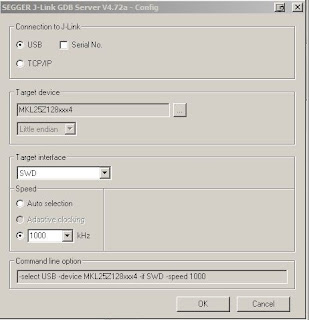 Press OK and it should display the following lines
 As you see, it's connected to my freedom board. Keep it running, we will connect to it once we complete debug settings in Eclipse.
5. step - set eclipse project
Before going further, your eclipse must have installed GDB Hardware Debugging plugin. If not, please find a tutorial how to install that plugin.
Open your mbed KL25Z project, select your project, click on the green bug (the top right corner on the picture) and select Debug configuration.
 Click with your right mouse button on GDB Hardware Debugging, create New one
 On the bottom of the window it is "Using GDB (DSF) Hardware .... Select other . Click on select other and we need to check button Use configuration specific and select Standard GDB Hardware
 Now we are back in Debug configurations, select Debugger tab and fill details according to the picture below
 The tab Startup needs this details
The first input window (Initialization Commands) contain on my side the following commands
target remote localhost:2331
monitor clrbp
monitor endian little
monitor speed 1000
monitor reset
monitor sleep 100
monitor speed auto
The last input window (Run Commands) (Note: I prefer to put a breakpoint in Reset_Handler)
break main
continue
 I assume your jlink gdb server is running, click on the debug icon on the bottom of Debug configurations window.
This should be your window (breakpoint is set in main, thus it stops there).

Now led should be blinking.
The debugging part over ! There are tutorials how to work with gdb. If anything not correct, please use comments below or contact me on mbed. I'll add this to my notepad there.
CMSIS-DAP with openOCD, external Jlink or openSDA Jlink firmware.
CMSIS-DAP is still in a development, according to the site cmsis-dap: add initial cmsis-dap support [openocd.zylin.com]. Thus I went straight to Jlink's options. The last option is the most useful for many users. I will describe to process how to set it and be able to debug your KL25Z with no external parts needed.
1. step - download Jlink firmware
Visit a webpage SEGGER openSDA Jlink [http://www.segger.com], there are links on the bottom of the webpage. Be aware of some limitations which are stated there.
Download OpenSDA Jlink firmware http://www.segger.com/admin/uploads/userfiles/file/J-Link/JLink_OpenSDA.zip
2. step - get serial number of openSDA
Switch your KL25Z to the bootloader mode (unconnect usb, hold reset button, plug it back in while holding button, release button). Copy there unzipped file JLink_OpenSDA.sda
Restart the board, then plug it back to your PC.
In case you don't have installed jlink software (gdb, jlink console). Get this program from here which will display the serial number of your openSDA jlink in order to download the jlink software (you need jlink's serial number which we obviously don't know as we don't have external tool).
3. step - install JLink software
Download Jlink firmware here JLink software [http://www.segger.com]
This will install Jlink configurator, check serial number, type it in the page pasted above and download jlink software.

After installing jlink software, navigate to a jlink's folder in my case c:\Program Files\Segger\JLinkARM_V472a, open JLink.exe program. It will display this warning, check the below button, it won't display today, and press accept.


4. step - run jlink gdb server
The program is located again in the Segger Jlink software folder, named JLinkGDBServer. Execute the program, it pops the config window, set it as it is shown on the picture:


5. step - set eclipse project
Before going further, your eclipse must have installed GDB Hardware Debugging plugin. If not, please find a tutorial how to install that plugin.
Open your mbed KL25Z project, select your project, click on the green bug (the top right corner on the picture) and select Debug configuration.


The first input window (Initialization Commands) contain on my side the following commands
target remote localhost:2331
monitor clrbp
monitor endian little
monitor speed 1000
monitor reset
monitor sleep 100
monitor speed auto
The last input window (Run Commands) (Note: I prefer to put a breakpoint in Reset_Handler)
break main
continue

This should be your window (breakpoint is set in main, thus it stops there).

Now led should be blinking.
The debugging part over ! There are tutorials how to work with gdb. If anything not correct, please use comments below or contact me on mbed. I'll add this to my notepad there.
July 10, 2013
Makefile for mbed with GCC on KL25
I pushed a Makefile for KL25Z mbed with ARM GCC to my github Makefile [https://github.com/0xc0170].
I intended to use only eclipse with all those available options. It turned out it was time-consuming to set everything correctly, therefore I wrote this makefile which made everything easier. Small modification should allow you to use it on different targets. I have seen gcc4mbed but that was too much files for my taste. The makefile follows the directory structure which is at the moment. It has changed recently and will be different I believe soon again.
Files which are used are not yet a part of mbed, I am still facing a problem with binary created. It just locks KL25Z and does not run. I'll prepare an article how to debug KL25Z in eclipse with mbed.
I intended to use only eclipse with all those available options. It turned out it was time-consuming to set everything correctly, therefore I wrote this makefile which made everything easier. Small modification should allow you to use it on different targets. I have seen gcc4mbed but that was too much files for my taste. The makefile follows the directory structure which is at the moment. It has changed recently and will be different I believe soon again.
Files which are used are not yet a part of mbed, I am still facing a problem with binary created. It just locks KL25Z and does not run. I'll prepare an article how to debug KL25Z in eclipse with mbed.
Subscribe to:
Posts (Atom)